Currently, auto-assignment runs only during conversation creation or
update events. If no agents are online when new conversations arrive,
those conversations remain unassigned.

With this change, unassigned conversations will be automatically
assigned once agents become available. The job runs every 15 minutes and
uses a fair distribution threshold of 100 to prevent a large number of
conversations from being assigned to a single available agent. This will
be customizable later.
Added comprehensive Twilio WhatsApp content template support (Phase 1)
enabling text, media, and quick reply templates with proper parameter
conversion, sync capabilities.

 **Template Types Supported**
  - Basic Text Templates: Simple text with variables ({{1}}, {{2}})
  - Media Templates: Image/Video/Document templates with text variables
  - Quick Reply Templates: Interactive button templates

 Front end changes is available via #12277

---------

Co-authored-by: Copilot <175728472+Copilot@users.noreply.github.com>
Co-authored-by: Sivin Varghese <64252451+iamsivin@users.noreply.github.com>
Added support for Telegram Business bots. Telegram webhooks from such bots include the business_message field, which we transform into a standard message for Chatwoot. This PR also modifies how we handle replies, attachments, and image uploads when working with Telegram Business bots.
demo: https://drive.google.com/file/d/1Yz82wXBVRtb-mxjXogkUju4hlJbt3qyh/view?usp=sharing&t=4Fixes#10181
- Automate the deletion of accounts that have requested deletion via
account settings.
- Add a Sidekiq job that runs daily to find accounts that have requested
deletion and have passed the 7-day window.
- This job deletes the account and then soft-deletes users if they do
not belong to any other account.
- This job also sends an email to the Chatwoot instance admin for
compliance purposes.
- The Chatwoot instance admin's email is configurable via the
`CHATWOOT_INSTANCE_ADMIN_EMAIL` global config.

---------

Co-authored-by: Sojan Jose <sojan@pepalo.com>
### Summary

- Converts conversation auto-resolution duration from days to minutes
for more
granular control
- Updates validation to allow values from 10 minutes (minimum) to 999
days (maximum)
- Implements smart messaging to show appropriate time units in activity
messages

###  Changes

- Created migration to convert existing durations from days to minutes
(x1440)
- Updated conversation resolver to use minutes instead of days
- Added dynamic translation key selection based on duration value
- Updated related specs and documentation
- Added support for displaying durations in days, hours, or minutes
based on value

###  Test plan

- Verify account validation accepts new minute-based ranges
- Confirm existing account settings are correctly migrated
- Test auto-resolution works properly with minute values
- Ensure proper time unit display in activity messages

---------

Co-authored-by: Sivin Varghese <64252451+iamsivin@users.noreply.github.com>
- Added an api endpoint for update message status ( available only for
api inboxes )
- Moved message status management to a service.
- Handles case where read status arrive before delivered

fixes: #10314 , #9962
- Add agent bots management UI in settings with avatar upload
- Enable agent bot configuration for all inbox types
- Implement proper CRUD operations with webhook URL support
- Fix agent bots menu item visibility in settings sidebar
- Remove all CSML-related code and features
- Add migration to convert existing CSML bots to webhook bots
- Simplify agent bot model and services to focus on webhook bots
- Improve UI to differentiate between system bots and account bots

## Video


https://github.com/user-attachments/assets/3f4edbb7-b758-468c-8dd6-a9537b983f7d

---------

Co-authored-by: iamsivin <iamsivin@gmail.com>
Co-authored-by: Sivin Varghese <64252451+iamsivin@users.noreply.github.com>
Co-authored-by: Muhsin Keloth <muhsinkeramam@gmail.com>
Co-authored-by: Pranav <pranav@chatwoot.com>
This PR introduces basic minimum version of **Instagram Business
Login**, making Instagram inbox setup more straightforward by removing
the Facebook Page dependency. This update enhances user experience and
aligns with Meta’s recommended best practices.
Fixes
https://linear.app/chatwoot/issue/CW-3728/instagram-login-how-to-implement-the-changes
## Why Introduce Instagram as a Separate Inbox?
Currently, our Instagram integration requires linking an Instagram
account to a Facebook Page, making setup complex. To simplify this
process, Instagram now offers **Instagram Business Login**, which allows
users to authenticate directly with their Instagram credentials.
The **Instagram API with Instagram Login** enables businesses and
creators to send and receive messages without needing a Facebook Page
connection. While an Instagram Business or Creator account is still
required, this approach provides a more straightforward integration
process.
| **Existing Approach (Facebook Login for Business)** | **New Approach
(Instagram Business Login)** |
| --- | --- |
| Requires linking Instagram to a Facebook Page | No Facebook Page
required |
| Users log in via Facebook credentials | Users log in via Instagram
credentials |
| Configuration is more complex | Simpler setup |
Meta recommends using **Instagram Business Login** as the preferred
authentication method due to its easier configuration and improved
developer experience.
---
## Implementation Plan
The core messaging functionality is already in place, but the transition
to **Instagram Business Login** requires adjustments.
### Changes & Considerations
- **API Adjustments**: The Instagram API uses `graph.instagram`, whereas
Koala (our existing library) interacts with `graph.facebook`. We may
need to modify API calls accordingly.
- **Three Main Modules**:
1. **Instagram Business Login** – Handle authentication flow.
2. **Permissions & Features** – Ensure necessary API scopes are granted.
3. **Webhooks** – Enable real-time message retrieval.

---
## Instagram Login Flow
1. User clicks **"Create Inbox"** for Instagram.
2. App redirects to the [Instagram Authorization
URL](https://developers.facebook.com/docs/instagram-platform/instagram-api-with-instagram-login/business-login#embed-the-business-login-url).
3. After authentication, Instagram returns an authorization code.
5. The app exchanges the code for a **long-lived token** (valid for 60
days).
6. Tokens are refreshed periodically to maintain access.
7. Once completed, the app creates an inbox and redirects to the
Chatwoot dashboard.
---
## How to Test the Instagram Inbox
1. Create a new app on [Meta's Developer
Portal](https://developers.facebook.com/apps/).
2. Select **Business** as the app type and configure it.
3. Add the Instagram product and connect a business account.
4. Copy Instagram app ID and Instagram app secret
5. Add the Instagram app ID and Instagram app secret to your app config
via `{Chatwoot installation
url}/super_admin/app_config?config=instagram`
6. Configure Webhooks:
- Callback URL: `{your_chatwoot_url}/webhooks/instagram`
- Verify Token: `INSTAGRAM_VERIFY_TOKEN`
- Subscribe to `messages`, `messaging_seen`, and `message_reactions`
events.
7. Set up **Instagram Business Login**:
- Redirect URL: `{your_chatwoot_url}/instagram/callback`
8. Test inbox creation via the Chatwoot dashboard.
## Troubleshooting & Common Errors
### Insufficient Developer Role Error
- Ensure the Instagram user is added as a developer:
- **Meta Dashboard → App Roles → Roles → Add People → Enter Instagram
ID**
### API Access Deactivated
- Ensure the **Privacy Policy URL** is valid and correctly set.
### Invalid request: Request parameters are invalid: Invalid
redirect_uri
- Please configure the Frontend URL. The Frontend URL does not match the
authorization URL.
---
## To-Do List
- [x] Basic integration setup completed.
- [x] Enable sending messages via [Messaging
API](https://developers.facebook.com/docs/instagram-platform/instagram-api-with-instagram-login/messaging-api).
- [x] Implement automatic webhook subscriptions on inbox creation.
- [x] Handle **canceled authorization errors**.
- [x] Handle all the errors
https://developers.facebook.com/docs/instagram-platform/instagram-graph-api/reference/error-codes
- [x] Dynamically fetch **account IDs** instead of hardcoding them.
- [x] Prevent duplicate Instagram channel creation for the same account.
- [x] Use **Global Config** instead of environment variables.
- [x] Explore **Human Agent feature** for message handling.
- [x] Write and refine **test cases** for all scenarios.
- [x] Implement **token refresh mechanism** (tokens expire after 60
days).
Fixes https://github.com/chatwoot/chatwoot/issues/10440
---------
Co-authored-by: Sivin Varghese <64252451+iamsivin@users.noreply.github.com>
Co-authored-by: Copilot Autofix powered by AI <62310815+github-advanced-security[bot]@users.noreply.github.com>
Co-authored-by: Shivam Mishra <scm.mymail@gmail.com>
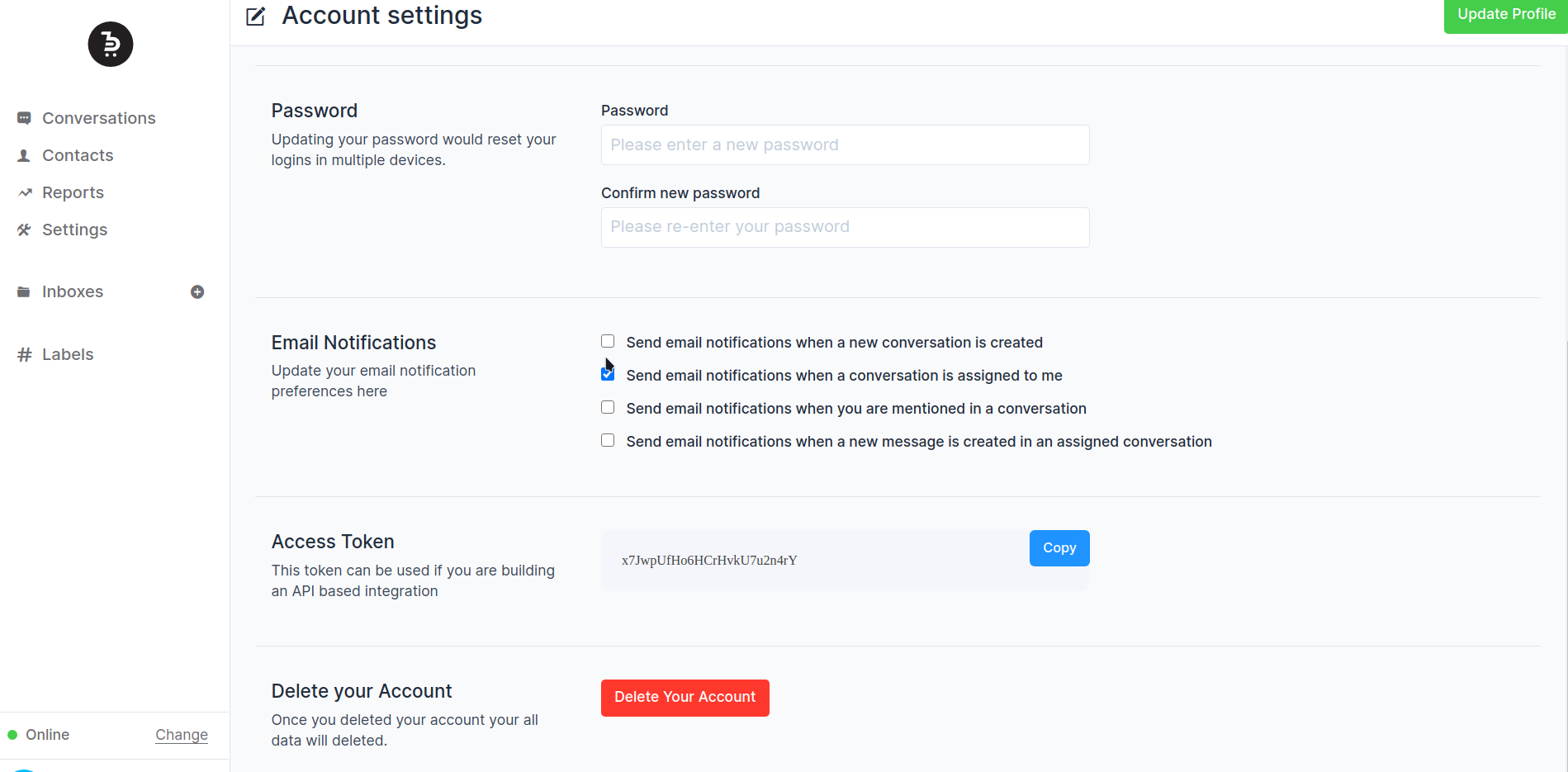
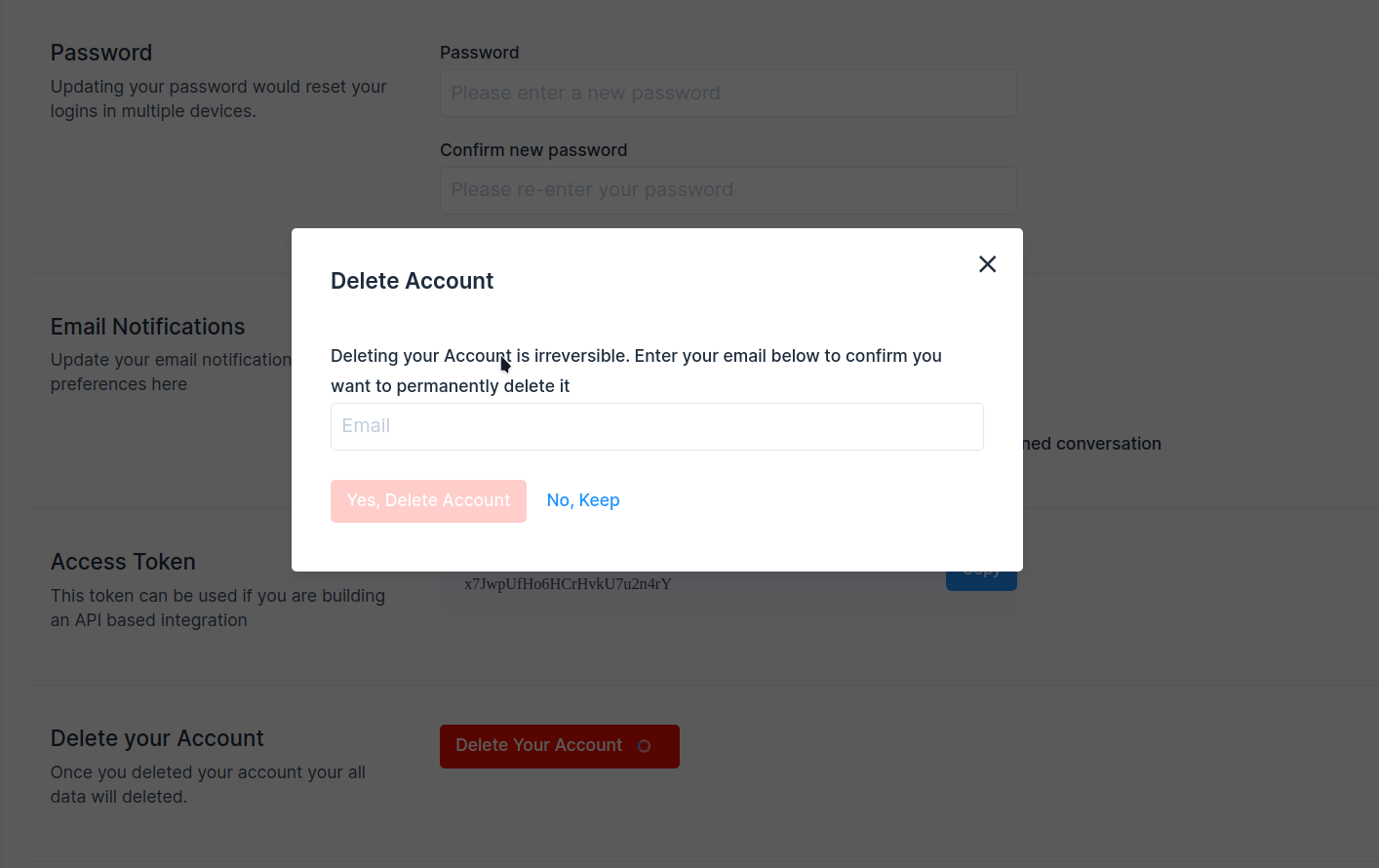
## Description
Add account delete option in the user account settings.
Fixes#1555
## Type of change
- [ ] New feature (non-breaking change which adds functionality)
## Checklist:
- [ ] My code follows the style guidelines of this project
- [ ] I have performed a self-review of my own code
- [ ] I have commented on my code, particularly in hard-to-understand
areas
- [ ] I have made corresponding changes to the documentation
- [ ] My changes generate no new warnings
- [ ] I have added tests that prove my fix is effective or that my
feature works
- [ ] New and existing unit tests pass locally with my changes
- [ ] Any dependent changes have been merged and published in downstream
modules
---------
Co-authored-by: Sojan Jose <sojan@pepalo.com>
Co-authored-by: Sojan Jose <sojan.official@gmail.com>
Co-authored-by: Muhsin Keloth <muhsinkeramam@gmail.com>
- Add a job to remove stale contacts and contact_inboxes across all accounts

Stale anonymous contact is defined as
- have no identification (email, phone_number, and identifier are NULL)
- have no conversations
- are older than 30 days

---------

Co-authored-by: Pranav <pranav@chatwoot.com>
Co-authored-by: Shivam Mishra <scm.mymail@gmail.com>
- Twilio events were being processed synchronously, leading to slow API
responses.
- This change moves Twilio event processing to a background job to
improve performance and align with how other events (e.g., WhatsApp) are
handled.

---------

Co-authored-by: Pranav <pranav@chatwoot.com>
- Add a warning logger for cases where we are getting webhook events for
inactive numbers.
- Add config to discard events for inactive numbers so that the meta
will stop sending events

---------

Co-authored-by: Pranav <pranav@chatwoot.com>
During high-traffic periods, events may appear out of order, causing the
conversation job to queue outdated data, which can lead to issues in the
UI. This update ensures that only the latest available data is sent to the UI.

The conversation object is refreshed before sending it to the UI.
Migration Guide: https://chwt.app/v4/migration

This PR imports all the work related to Captain into the EE codebase. Captain represents the AI-based features in Chatwoot and includes the following key components:

- Assistant: An assistant has a persona, the product it would be trained on. At the moment, the data at which it is trained is from websites. Future integrations on Notion documents, PDF etc. This PR enables connecting an assistant to an inbox. The assistant would run the conversation every time before transferring it to an agent.
- Copilot for Agents: When an agent is supporting a customer, we will be able to offer additional help to lookup some data or fetch information from integrations etc via copilot.
- Conversation FAQ generator: When a conversation is resolved, the Captain integration would identify questions which were not in the knowledge base.
- CRM memory: Learns from the conversations and identifies important information about the contact.

---------

Co-authored-by: Vishnu Narayanan <vishnu@chatwoot.com>
Co-authored-by: Sojan <sojan@pepalo.com>
Co-authored-by: iamsivin <iamsivin@gmail.com>
Co-authored-by: Sivin Varghese <64252451+iamsivin@users.noreply.github.com>
Invalid urls supplied to the job was causing sentry issues. The issue primarily occurs when the download file.original_filename comes out as empty

fixes: https://github.com/chatwoot/chatwoot/issues/10449
This pull request enhances the export contacts feature by adding a confirmation step before exporting. Previously, clicking the export button would trigger the export action without confirmation.

Additionally, it ensures that only the intended recipient receives the export email, addressing the previous behaviour where all administrators received it.

Fixes: #8504

Co-authored-by: Sojan Jose <sojan@pepalo.com>


