This PR introduces basic minimum version of **Instagram Business
Login**, making Instagram inbox setup more straightforward by removing
the Facebook Page dependency. This update enhances user experience and
aligns with Meta’s recommended best practices.
Fixes
https://linear.app/chatwoot/issue/CW-3728/instagram-login-how-to-implement-the-changes
## Why Introduce Instagram as a Separate Inbox?
Currently, our Instagram integration requires linking an Instagram
account to a Facebook Page, making setup complex. To simplify this
process, Instagram now offers **Instagram Business Login**, which allows
users to authenticate directly with their Instagram credentials.
The **Instagram API with Instagram Login** enables businesses and
creators to send and receive messages without needing a Facebook Page
connection. While an Instagram Business or Creator account is still
required, this approach provides a more straightforward integration
process.
| **Existing Approach (Facebook Login for Business)** | **New Approach
(Instagram Business Login)** |
| --- | --- |
| Requires linking Instagram to a Facebook Page | No Facebook Page
required |
| Users log in via Facebook credentials | Users log in via Instagram
credentials |
| Configuration is more complex | Simpler setup |
Meta recommends using **Instagram Business Login** as the preferred
authentication method due to its easier configuration and improved
developer experience.
---
## Implementation Plan
The core messaging functionality is already in place, but the transition
to **Instagram Business Login** requires adjustments.
### Changes & Considerations
- **API Adjustments**: The Instagram API uses `graph.instagram`, whereas
Koala (our existing library) interacts with `graph.facebook`. We may
need to modify API calls accordingly.
- **Three Main Modules**:
1. **Instagram Business Login** – Handle authentication flow.
2. **Permissions & Features** – Ensure necessary API scopes are granted.
3. **Webhooks** – Enable real-time message retrieval.

---
## Instagram Login Flow
1. User clicks **"Create Inbox"** for Instagram.
2. App redirects to the [Instagram Authorization
URL](https://developers.facebook.com/docs/instagram-platform/instagram-api-with-instagram-login/business-login#embed-the-business-login-url).
3. After authentication, Instagram returns an authorization code.
5. The app exchanges the code for a **long-lived token** (valid for 60
days).
6. Tokens are refreshed periodically to maintain access.
7. Once completed, the app creates an inbox and redirects to the
Chatwoot dashboard.
---
## How to Test the Instagram Inbox
1. Create a new app on [Meta's Developer
Portal](https://developers.facebook.com/apps/).
2. Select **Business** as the app type and configure it.
3. Add the Instagram product and connect a business account.
4. Copy Instagram app ID and Instagram app secret
5. Add the Instagram app ID and Instagram app secret to your app config
via `{Chatwoot installation
url}/super_admin/app_config?config=instagram`
6. Configure Webhooks:
- Callback URL: `{your_chatwoot_url}/webhooks/instagram`
- Verify Token: `INSTAGRAM_VERIFY_TOKEN`
- Subscribe to `messages`, `messaging_seen`, and `message_reactions`
events.
7. Set up **Instagram Business Login**:
- Redirect URL: `{your_chatwoot_url}/instagram/callback`
8. Test inbox creation via the Chatwoot dashboard.
## Troubleshooting & Common Errors
### Insufficient Developer Role Error
- Ensure the Instagram user is added as a developer:
- **Meta Dashboard → App Roles → Roles → Add People → Enter Instagram
ID**
### API Access Deactivated
- Ensure the **Privacy Policy URL** is valid and correctly set.
### Invalid request: Request parameters are invalid: Invalid
redirect_uri
- Please configure the Frontend URL. The Frontend URL does not match the
authorization URL.
---
## To-Do List
- [x] Basic integration setup completed.
- [x] Enable sending messages via [Messaging
API](https://developers.facebook.com/docs/instagram-platform/instagram-api-with-instagram-login/messaging-api).
- [x] Implement automatic webhook subscriptions on inbox creation.
- [x] Handle **canceled authorization errors**.
- [x] Handle all the errors
https://developers.facebook.com/docs/instagram-platform/instagram-graph-api/reference/error-codes
- [x] Dynamically fetch **account IDs** instead of hardcoding them.
- [x] Prevent duplicate Instagram channel creation for the same account.
- [x] Use **Global Config** instead of environment variables.
- [x] Explore **Human Agent feature** for message handling.
- [x] Write and refine **test cases** for all scenarios.
- [x] Implement **token refresh mechanism** (tokens expire after 60
days).
Fixes https://github.com/chatwoot/chatwoot/issues/10440
---------
Co-authored-by: Sivin Varghese <64252451+iamsivin@users.noreply.github.com>
Co-authored-by: Copilot Autofix powered by AI <62310815+github-advanced-security[bot]@users.noreply.github.com>
Co-authored-by: Shivam Mishra <scm.mymail@gmail.com>
## Description
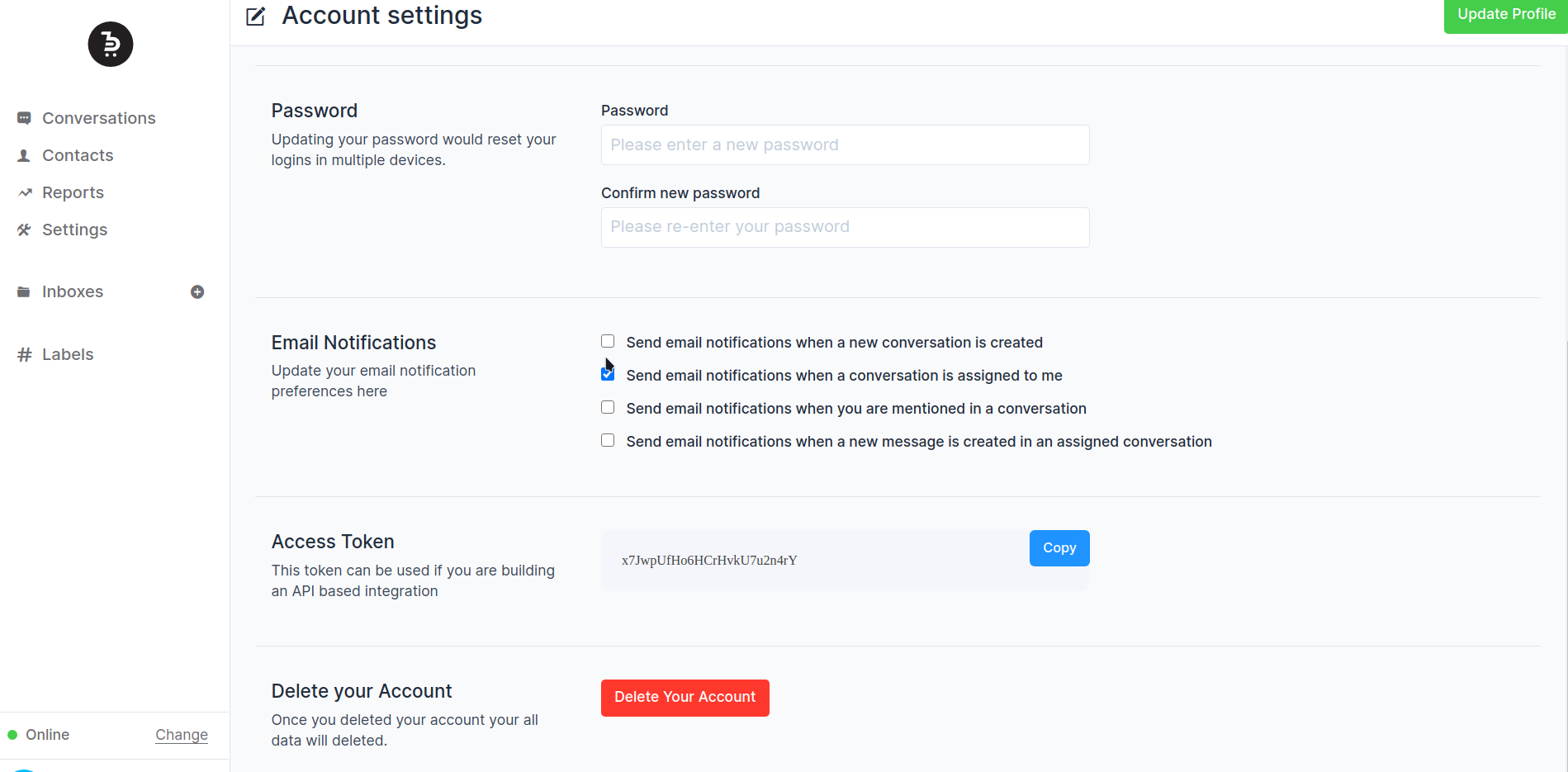
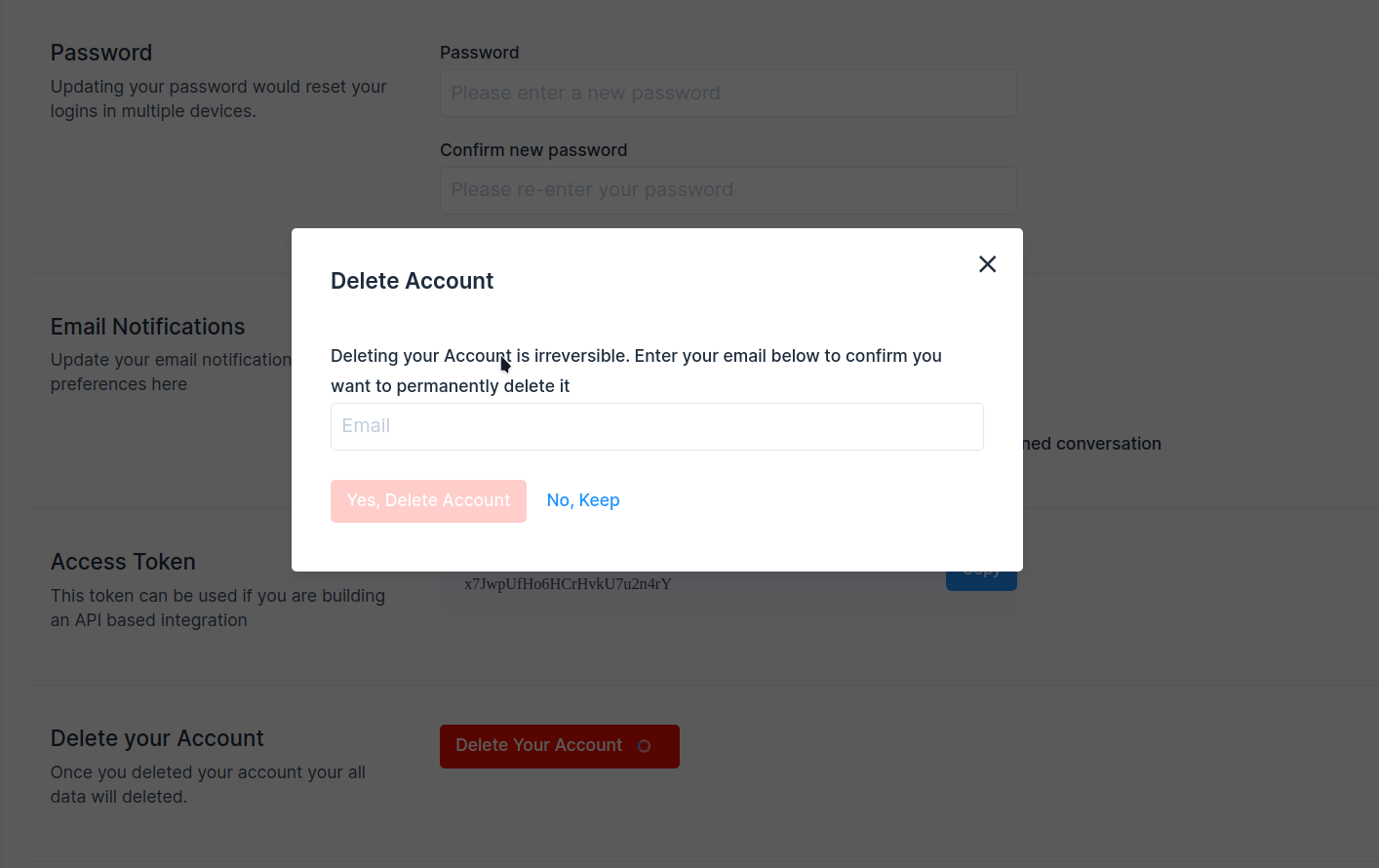
Add account delete option in the user account settings.
Fixes#1555
## Type of change
- [ ] New feature (non-breaking change which adds functionality)
## Checklist:
- [ ] My code follows the style guidelines of this project
- [ ] I have performed a self-review of my own code
- [ ] I have commented on my code, particularly in hard-to-understand
areas
- [ ] I have made corresponding changes to the documentation
- [ ] My changes generate no new warnings
- [ ] I have added tests that prove my fix is effective or that my
feature works
- [ ] New and existing unit tests pass locally with my changes
- [ ] Any dependent changes have been merged and published in downstream
modules
---------
Co-authored-by: Sojan Jose <sojan@pepalo.com>
Co-authored-by: Sojan Jose <sojan.official@gmail.com>
Co-authored-by: Muhsin Keloth <muhsinkeramam@gmail.com>
- Add a job to remove stale contacts and contact_inboxes across all accounts

Stale anonymous contact is defined as
- have no identification (email, phone_number, and identifier are NULL)
- have no conversations
- are older than 30 days

---------

Co-authored-by: Pranav <pranav@chatwoot.com>
Co-authored-by: Shivam Mishra <scm.mymail@gmail.com>
- Twilio events were being processed synchronously, leading to slow API
responses.
- This change moves Twilio event processing to a background job to
improve performance and align with how other events (e.g., WhatsApp) are
handled.

---------

Co-authored-by: Pranav <pranav@chatwoot.com>
- Add a warning logger for cases where we are getting webhook events for
inactive numbers.
- Add config to discard events for inactive numbers so that the meta
will stop sending events

---------

Co-authored-by: Pranav <pranav@chatwoot.com>
During high-traffic periods, events may appear out of order, causing the
conversation job to queue outdated data, which can lead to issues in the
UI. This update ensures that only the latest available data is sent to the UI.

The conversation object is refreshed before sending it to the UI.
Migration Guide: https://chwt.app/v4/migration

This PR imports all the work related to Captain into the EE codebase. Captain represents the AI-based features in Chatwoot and includes the following key components:

- Assistant: An assistant has a persona, the product it would be trained on. At the moment, the data at which it is trained is from websites. Future integrations on Notion documents, PDF etc. This PR enables connecting an assistant to an inbox. The assistant would run the conversation every time before transferring it to an agent.
- Copilot for Agents: When an agent is supporting a customer, we will be able to offer additional help to lookup some data or fetch information from integrations etc via copilot.
- Conversation FAQ generator: When a conversation is resolved, the Captain integration would identify questions which were not in the knowledge base.
- CRM memory: Learns from the conversations and identifies important information about the contact.

---------

Co-authored-by: Vishnu Narayanan <vishnu@chatwoot.com>
Co-authored-by: Sojan <sojan@pepalo.com>
Co-authored-by: iamsivin <iamsivin@gmail.com>
Co-authored-by: Sivin Varghese <64252451+iamsivin@users.noreply.github.com>
Invalid urls supplied to the job was causing sentry issues. The issue primarily occurs when the download file.original_filename comes out as empty

fixes: https://github.com/chatwoot/chatwoot/issues/10449
This pull request enhances the export contacts feature by adding a confirmation step before exporting. Previously, clicking the export button would trigger the export action without confirmation.

Additionally, it ensures that only the intended recipient receives the export email, addressing the previous behaviour where all administrators received it.

Fixes: #8504

Co-authored-by: Sojan Jose <sojan@pepalo.com>
- This PR introduces a modification to the channel fetching logic, ensuring that channels with older message_template_last_updated timestamps are prioritized during synchronization.
- Reorganizing installation config settings to move more configurations into UI from environment variables
- Changes to installation config to support premium plans in the enterprise edition
- Fixes the broken premium indicator in account/show and accounts/edit page
Fixes the follow cases
- The ensure block released the lock even on LockAcquisitionError
- Custom timeout was not allowed

This also refactored the with_lock method, now the key has to be constructed in the parent function itself

Co-authored-by: Sojan Jose <sojan@pepalo.com>
This allows a user to add/update a custom regex and a cue while defining custom attributes(Only applicable for type- text).
While adding/editing custom attributes, the values are validated against the attribute definition regex, and if it is incorrect, a cue message or default error message is shown and restricts invalid values from being saved.

Fixes: #6866
Consider a scenario where two jobs are concurrently accessing a job with a lock mechanism. If the second job accesses lock_manager.locked? before the first job called lock_manager.lock(lock_key), it would return a false positive. At this point, both jobs can be executed freely.

To address this issue, the following change ensures that only the current thread that has set the lock can execute. Otherwise, a LockAcquisitionError will be thrown.

Co-authored-by: Sojan Jose <sojan@pepalo.com>
Co-authored-by: Shivam Mishra <scm.mymail@gmail.com>
The Inboxes::FetchImapEmailsJob is designed to fetch the entire email object and check if its message id is already in the database. However, this process is resource-intensive and time-consuming, as fetching the full email object takes a significant amount of time.
On average, fetching 100 emails can take approximately 3-4 minutes to complete depending on the IMAP server. Since we are not using server flags to identify which emails have already been fetched (to avoid compatibility issues with flags in different email services), we have to fetch all previously available emails. Currently we fetch all the messages that were created from yesterday. This becomes problematic with services like Gmail, which throttle requests based on bandwidth usage.
To address this issue, I have updated the logic as follows:
Fetch the sequence IDs of all the mails in the "Inbox" that were created from yesterday.
Use the FETCH command to fetch only the message-ids using BODY.PEEK[HEADER.FIELDS (MESSAGE-ID)] with the sequence IDs we got in the previous step. This is a faster operation with lower bandwidth usage, as it only returns the sequence ID and message ID.
Check if the message IDs are already present in the database for the selected inbox.
If not present, fetch the entire email object using the FETCH command and create the message.
If the message ID is already present, ignore it and move on to the next message-id.
I have also addressed the issue of duplicate emails appearing in conversations when two fetch email jobs occur simultaneously. I have added a lock for the channel to ensure that the job gracefully exits without waiting for the current job to complete.
Fixes#7247Fixes#6082Fixes#8314
Co-authored-by: Sojan <sojan@pepalo.com>
A support request that came to Chatwoot Cloud revealed that the job was timed prematurely. The default timeout for Sidekiq queues was set as 25 minutes in sidekiq.yml file. The cache was not created properly for the accounts with more than 100k conversations.

This change removes the cache logic in the previous migration and creates a new migration with a new job which processes conversations in batch.


